Note
Go to the end to download the full example code.
Pitch Types
A key design principle of mplsoccer is to support
different data providers by changing the pitch_type argument.
The current supported pitch types are printed below.
import pprint
import matplotlib.pyplot as plt
from mplsoccer import Pitch
from mplsoccer.soccer.dimensions import valid
pprint.pp(valid)
['statsbomb',
 'tracab',
 'opta',
 'wyscout',
 'uefa',
 'metricasports',
 'custom',
 'skillcorner',
 'secondspectrum',
 'impect']
StatsBomb
The default pitch is StatsBomb The xaxis limits are 0 to 120 and the yaxis limits are 80 to 0 (inverted).
pitch = Pitch(pitch_type='statsbomb', axis=True, label=True)
fig, ax = pitch.draw()

Tracab
Tracab are centered pitches for tracking data. The xaxis limits are -pitch_length/2 * 100 to pitch_length/2 * 100. The yaxis limits are -pitch_width/2 * 100 to pitch_width/2 * 100.
pitch = Pitch(pitch_type='tracab', pitch_width=68, pitch_length=105,
              axis=True, label=True)
fig, ax = pitch.draw()

Opta
Opta data from Stats Perform has both the x and y limits between 0 and 100. Opta pitch coordinates are used by Sofascore and WhoScored
pitch = Pitch(pitch_type='opta', axis=True, label=True)
fig, ax = pitch.draw()

Wyscout
Wyscout data from Hudl also has both the x and y limits between 0 and 100, but the y-axis is inverted.
pitch = Pitch(pitch_type='wyscout', axis=True, label=True)
fig, ax = pitch.draw()

Custom
The custom pitch allows you to set the limits of the pitch in meters by changing the pitch_length and pitch_width.
pitch = Pitch(pitch_type='custom', pitch_width=68, pitch_length=105,
              axis=True, label=True)
fig, ax = pitch.draw()

Uefa
The uefa pitch is a special case of the custom pitch with the pitch_length and pitch_width set to Uefa’s standard (105m * 65m).
pitch = Pitch(pitch_type='uefa', axis=True, label=True)
fig, ax = pitch.draw()

Metricasports
Metrica Sports has pitch limits are between 0 and 1, but the y-axis is inverted.
pitch = Pitch(pitch_type='metricasports', pitch_length=105, pitch_width=68,
              axis=True, label=True)
fig, ax = pitch.draw()

Skillcorner
SkillCorner has centered pitches from -pitch_width/2 to pitch_width/2 and -pitch_length/2 to pitch_length/2.
pitch = Pitch(pitch_type='skillcorner', pitch_length=105, pitch_width=68,
              axis=True, label=True)
fig, ax = pitch.draw()

Second Spectrum
Second Spectrum also has centered pitches from -pitch_width/2 to pitch_width/2 and -pitch_length/2 to pitch_length/2.
pitch = Pitch(pitch_type='secondspectrum', pitch_length=105, pitch_width=68,
              axis=True, label=True)
fig, ax = pitch.draw()
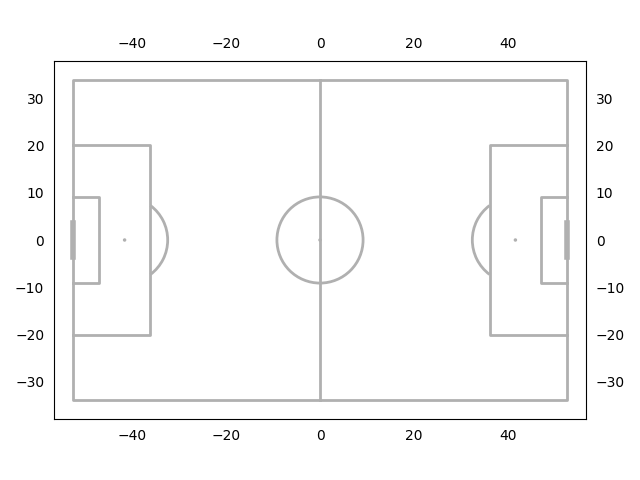
Impect
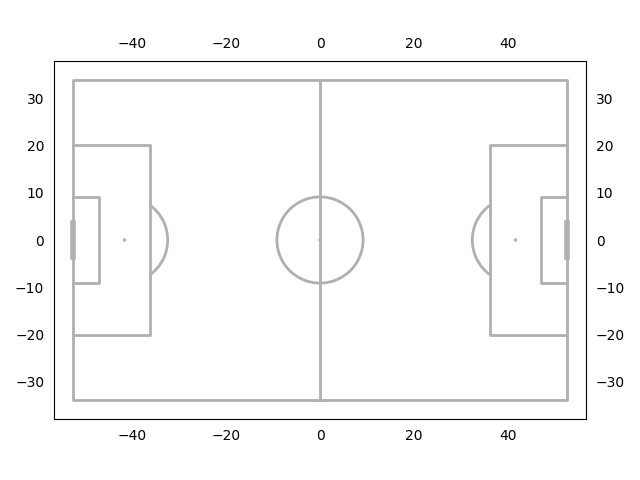
Impect has centered pitches from -52.5 to 52.5 (x-axis) and -34 to 34 (y-axis).
pitch = Pitch(pitch_type='impect', axis=True, label=True)
fig, ax = pitch.draw()
Standardized coordinates
Mplsoccer version 1.3.0 onwards also allows custom dimensions
to be passed to the pitch_type argument.
It is common in some machine learning methods to standardize values, e.g. coordinates.
However, you might still want to plot the standardized coordinates to check your transforms work.
You can use the center_scale_dims function to create custom centered pitch dimensions
and pass this to the pitch_type argument.
Below we create a pitch with limits between -1 and 1 (width/2 and length/2).
You can also change the width and length arguments to get different pitch limits.
The visual layout of the pitch is controlled by the pitch_width and pitch_length
arguments.
from mplsoccer.soccer.dimensions import center_scale_dims
from mplsoccer import Pitch
dim = center_scale_dims(pitch_width=68, pitch_length=105,
                        width=2, length=2, invert_y=False)
pitch = Pitch(pitch_type=dim, label=True, axis=True)
fig, ax = pitch.draw()

Other custom dimensions
Aditionally, you can create your own arbitrary dimensions.
See the mplsoccer.soccer.dimensions module
for examples of how to define the dimensions.
The custom dimensions object must be a subclass of ``mplsoccer.dimensions.BaseDims`
and can then be passed to the pitch_type argument.
plt.show() # If you are using a Jupyter notebook you do not need this line
Total running time of the script: (0 minutes 1.398 seconds)